
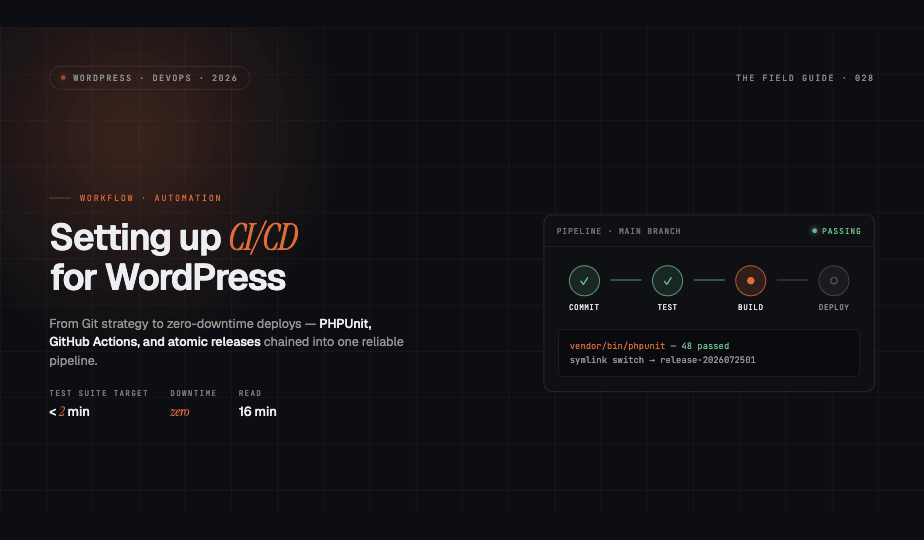

Why CI/CD Matters for WordPress Development
Continuous Integration and Continuous Deployment (CI/CD) transforms WordPress development from manual, error-prone processes into automated, reliable workflows. For agencies managing multiple client sites, CI/CD reduces deployment friction, catches bugs early, and ensures consistent quality across projects. This guide walks you through building a robust CI/CD pipeline tailored to WordPress-specific challenges.
Choosing Your Git Workflow Strategy
Your Git workflow forms the foundation of your CI/CD pipeline. Two primary strategies dominate modern development:
Trunk-Based Development
Trunk-based development encourages developers to commit small, frequent changes directly to the main branch. This approach minimizes merge conflicts and accelerates feedback loops. Teams use feature flags to hide incomplete work in production, enabling continuous deployment without exposing half-built features.
Best for small teams with strong testing discipline and rapid iteration cycles. Requires robust automated testing to maintain stability.
Feature Branch Workflow
Feature branches isolate work-in-progress changes until they're production-ready. Developers create branches for each feature or bug fix, then merge via pull requests after code review and testing. This strategy provides clear separation between stable and experimental code.
Ideal for larger teams, client work requiring approval stages, or projects with multiple parallel development tracks. Works seamlessly with staging environments that mirror feature branches.
Implementing Automated Testing
Automated testing catches issues before they reach production. WordPress projects benefit from layered testing strategies combining unit tests and end-to-end scenarios.
PHPUnit for Unit Testing
PHPUnit tests individual functions and methods in isolation. Install PHPUnit and the WordPress test suite:
composer require --dev phpunit/phpunit
composer require --dev yoast/phpunit-polyfills
bin/install-wp-tests.sh wordpress_test root '' localhost latest
Write tests for custom functionality, plugin logic, and theme functions. Focus on business-critical code paths and complex conditional logic. Structure tests to run quickly—aim for test suites completing in under two minutes.
Codeception for Integration Testing
Codeception excels at testing WordPress through browser automation and database interactions. Configure acceptance tests that verify complete user workflows:
composer require --dev lucatume/wp-browser
vendor/bin/codecept init wpbrowser
Test authentication flows, form submissions, e-commerce checkouts, and content publishing workflows. Integration tests catch issues that unit tests miss, like JavaScript interactions and third-party plugin conflicts.
Building CI Pipelines with GitHub Actions
GitHub Actions provides native CI/CD without external services. Create a workflow file at .github/workflows/ci.yml:
name: WordPress CI
on: [push, pull_request]
jobs:
  test:
    runs-on: ubuntu-latest
    services:
      mysql:
        image: mysql:8.0
    steps:
      - uses: actions/checkout@v3
      - name: Setup PHP
        uses: shivammathur/setup-php@v2
        with:
          php-version: '8.3'
      - name: Install dependencies
        run: composer install
      - name: Run tests
        run: vendor/bin/phpunit
Extend this foundation with code quality tools like PHP_CodeSniffer for WordPress Coding Standards compliance, and security scanners to detect vulnerabilities.
Configuring GitLab CI Pipelines
GitLab CI uses .gitlab-ci.yml for pipeline configuration. Define stages for testing, building, and deployment:
stages:
  - test
  - deploy

test:php:
  image: php:8.3
  stage: test
  script:
    - composer install
    - vendor/bin/phpunit

deploy:staging:
  stage: deploy
  script:
    - rsync -avz --delete ./ user@staging-server:/var/www/html/
  only:
    - develop
GitLab's integrated container registry simplifies dependency management and deployment artifacts.
Zero-Downtime Deployment Strategies
WordPress deployments require careful orchestration to avoid visitor disruptions. Implement atomic deployments using symlink switching:
Create timestamped release directories and maintain a current symlink pointing to the active release. Deploy new code to a fresh directory, run migrations and tests, then atomically switch the symlink. If issues arise, rollback by reverting the symlink to the previous release.
Tools like Deployer or custom deployment scripts handle this pattern reliably. Ensure your web server configuration follows symlinks correctly.
Managing WordPress-Specific Challenges
Database Migrations
WordPress database changes require version control and safe migration paths. Use plugins like WP-CFM for configuration management or custom migration scripts tracking schema versions. Run migrations automatically post-deployment using WP-CLI:
wp core update-db --network
Test migrations against production database snapshots in staging environments before deploying to production.
Plugin and Theme Updates
Version-lock all plugins and themes in composer.json using WPackagist or private repositories. Never auto-update in production. Test updates in isolated environments first:
composer update wpackagist-plugin/contact-form-7
Include plugin updates in your standard deployment pipeline with full test coverage.
Media File Handling
Media files live outside version control. Synchronize uploads directories separately using rsync during initial staging setup, then rely on shared storage or CDN solutions for ongoing management. Configure environments to use production media in staging via domain rewriting or proxy rules, avoiding duplicate storage.
Best Practices for Agency Workflows
Managing multiple client sites demands consistency and scalability. Maintain shared CI/CD templates across projects, standardize environment configurations using .env files, and implement comprehensive monitoring post-deployment. Use deployment gates requiring manual approval for production releases, especially for client-facing changes.
Document your CI/CD processes thoroughly and train team members on workflow expectations. The upfront investment in automation pays dividends through reduced errors, faster deployments, and confident iteration cycles.