

Understanding Performance Degradation in High-Volume WordPress Sites
When WordPress sites scale beyond thousands of posts, agencies managing news portals and large blogs encounter performance issues that standard caching cannot resolve. These bottlenecks stem from WordPress core's database architecture, which prioritizes flexibility over query efficiency at scale. Understanding these patterns is essential for maintaining performant client sites.
The most common performance killers emerge from three areas: complex taxonomy queries across large term relationships, inefficient post meta lookups through the highly normalized meta tables, and archive pagination that degenerates as offset values increase. Each problem requires targeted optimization strategies.
Taxonomy Query Performance Issues
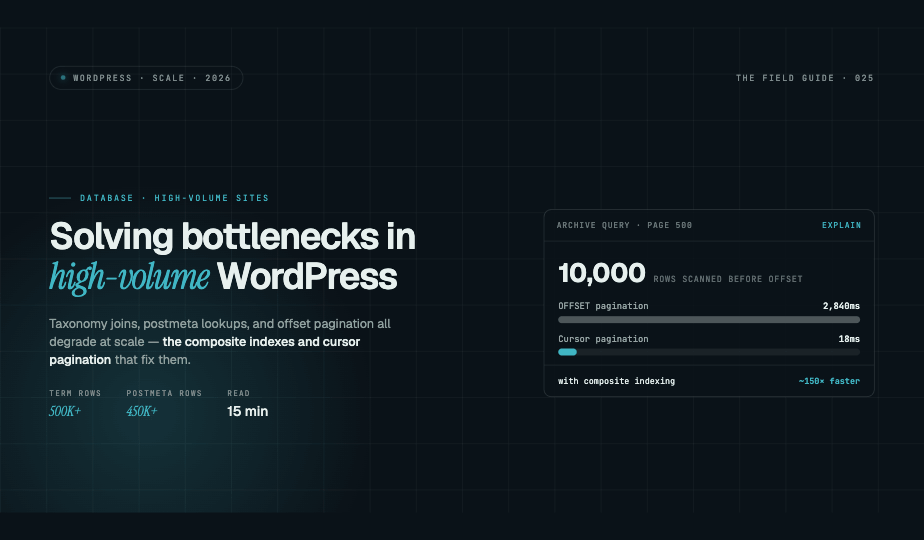
WordPress stores term relationships in the wp_term_relationships table, which grows exponentially on sites with comprehensive tagging systems. A news portal with 50,000 posts and average 10 tags per post creates 500,000 relationship rows. Queries filtering by multiple taxonomies require expensive JOIN operations.
The primary issue occurs when queries combine multiple taxonomy filters. WordPress generates subqueries for each taxonomy, then intersects results. With missing indexes, MySQL performs full table scans. Monitor slow query logs for queries joining wp_term_relationships multiple times.
Database Indexing for Taxonomies
Add composite indexes that match your most frequent query patterns. For sites filtering posts by category and tag combinations, create an index on term_taxonomy_id and object_id together:
ALTER TABLE wp_term_relationships ADD INDEX idx_term_object (term_taxonomy_id, object_id);
For taxonomy archive pages, ensure the wp_term_taxonomy table has an index on taxonomy and term_id:
ALTER TABLE wp_term_taxonomy ADD INDEX idx_taxonomy_term (taxonomy, term_id);
These indexes dramatically reduce query execution time from seconds to milliseconds on properly sized hardware.
Post Meta Lookup Optimization
The wp_postmeta table becomes a performance nightmare at scale. WordPress stores all custom fields as key-value pairs, requiring separate rows for each meta field per post. A site with 30,000 posts and 15 meta fields per post contains 450,000 postmeta rows.
Queries filtering or sorting by custom fields require JOINing the postmeta table multiple times. Each JOIN multiplies query complexity. Sites using custom fields for filtering, publication dates, featured status, view counts, experience severe slowdowns.
Strategic Meta Table Indexing
Create indexes matching your most critical meta queries. For queries filtering by specific meta keys:
ALTER TABLE wp_postmeta ADD INDEX idx_meta_key_value (meta_key, meta_value(191));
For queries joining postmeta by post ID and specific keys:
ALTER TABLE wp_postmeta ADD INDEX idx_post_meta_key (post_id, meta_key);
The meta_value column often contains long text, so limit index length to 191 characters for optimal performance and utf8mb4 compatibility.
Architectural Solutions for Meta Queries
For sites heavily dependent on meta queries, consider denormalization strategies. Create custom tables for frequently queried meta fields. Instead of storing publication metadata in postmeta, create a dedicated table with proper column types and indexes.
Use WordPress actions like save_post to synchronize data between your custom table and postmeta, maintaining compatibility with plugins while gaining query performance. This approach works exceptionally well for numeric meta fields used in sorting or filtering.
Archive Pagination Performance Problems
WordPress pagination uses MySQL OFFSET for archive pages, which becomes pathologically slow on deep pages. Requesting page 500 of a blog archive forces MySQL to retrieve and discard 10,000 rows before returning results. Query time increases linearly with page depth.
News sites with date-based archives and category archives experience this acutely. Users navigating deep archives or search engine crawlers indexing old content trigger expensive queries that lock database resources.
Cursor-Based Pagination
Replace offset-based pagination with cursor-based pagination using post IDs or dates. Modify WP_Query arguments to use date_query with comparisons instead of paged parameters:
$args = array(
    'posts_per_page' => 20,
    'date_query' => array(
        array(
            'before' => $last_post_date,
            'inclusive' => false
        )
    ),
    'orderby' => 'date',
    'order' => 'DESC'
);
This approach maintains constant query performance regardless of pagination depth. Implement custom pagination links that pass cursor parameters instead of page numbers.
Query Monitoring and Optimization Workflow
Install Query Monitor plugin on staging environments to identify problematic queries. Focus on queries exceeding 1 second execution time or those called repeatedly per page load. Export slow query logs from MySQL and analyze patterns.
Test index additions on staging databases first. Use EXPLAIN statements to verify MySQL utilizes new indexes. Monitor query execution time improvements and ensure indexes don't negatively impact write performance on high-traffic sites.
Scaling WordPress Without Migration
These optimization strategies enable WordPress to handle hundreds of thousands of posts efficiently. Combined with object caching, database replication for read queries, and proper server resources, WordPress scales to enterprise requirements.
For agencies managing content-heavy client sites, mastering database optimization preserves client investment in WordPress ecosystems while delivering performance that matches modern expectations. The flexibility that makes WordPress popular need not sacrifice performance at scale.