

The Multi-Site Management Dilemma
Agencies and developers managing multiple client WordPress sites face a critical architecture decision: should you consolidate everything into a WordPress Multisite network, or maintain separate installations for each client? This choice affects everything from your daily workflow to your hosting costs and client billing structure.
Both approaches have legitimate use cases, but the wrong choice can create technical debt that haunts you for years. Let's break down the real-world implications of each architecture so you can make an informed decision based on your specific circumstances.
WordPress Multisite: The Consolidated Approach
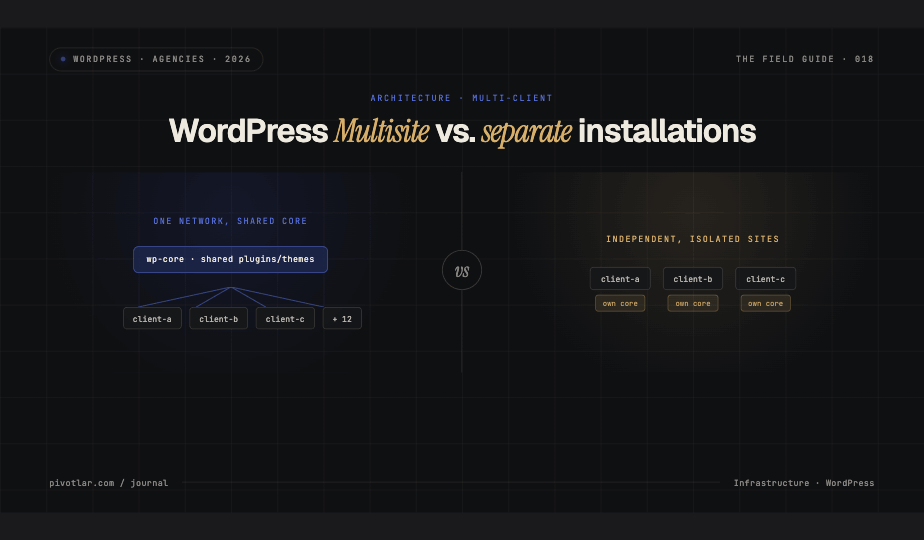
WordPress Multisite allows you to manage multiple sites from a single WordPress installation. All sites share the same core files, plugins, and themes, while maintaining separate databases for content and settings.
The Advantages of Multisite
The efficiency gains can be substantial. With Multisite, you update WordPress core, plugins, and themes once across all sites. This dramatically reduces maintenance time, instead of logging into twenty different dashboards, you handle updates from a single super admin interface.
Resource efficiency is another major benefit. Since all sites share the same codebase, your server memory footprint is significantly smaller. A single set of PHP files serves multiple sites, reducing disk space requirements and making backups more manageable.
For agencies offering standardized packages, Multisite enables true economies of scale. You can provision new client sites in minutes by activating a subsite, applying a pre-configured theme, and enabling standard plugins. This consistency also simplifies your support workflow, every site follows the same architecture.
The Hidden Costs of Multisite
Plugin compatibility becomes your primary challenge. Not all WordPress plugins are Multisite-compatible, and those that claim compatibility often have limitations. Some plugins store data globally across the network when you need per-site isolation, while others simply break in unexpected ways.
When plugin conflicts occur in Multisite, they affect the entire network. A single incompatible plugin can bring down all client sites simultaneously. This creates substantial risk that separate installations don't share. Troubleshooting becomes more complex because you're diagnosing issues across a shared environment rather than isolated instances.
Performance tuning requires network-level thinking. You can't easily allocate more resources to a high-traffic client site without affecting others on the same network. Object caching, CDN configuration, and performance optimizations must work for all sites or none, there's limited room for per-site customization.
Client billing and resource attribution gets complicated. How do you fairly charge clients when they share infrastructure? Tracking which site consumes what resources requires additional tooling. Many agencies end up with flat-rate pricing that doesn't reflect actual usage differences between clients.
Separate Installations: The Isolated Approach
Managing separate WordPress installations means each client site runs independently with its own core files, plugins, themes, and database. This is the traditional approach that most agencies default to initially.
The Advantages of Separation
Complete isolation is the standout benefit. When a plugin causes problems on one site, it affects only that client. You can test updates on low-stakes sites before rolling them out to critical clients. Each site can run different plugin versions if necessary, giving you flexibility that Multisite can't match.
Resource allocation becomes straightforward. High-traffic clients can have dedicated resources or upgraded hosting tiers. You can implement aggressive caching for some sites while keeping others more dynamic. Performance optimization happens at the site level, allowing tailored solutions.
Billing transparency improves dramatically. You can track exact resource usage per client and charge accordingly. Hosting costs map directly to individual sites, making your pricing structure defensible and scalable. Clients understand they're paying for their specific resource consumption.
Plugin and theme flexibility is unrestricted. Want to run a cutting-edge plugin for one client and a stable legacy version for another? No problem. Need to use Multisite-incompatible plugins? Go ahead. Each site operates as an independent entity with its own requirements.
The Management Overhead
Update management becomes your biggest time sink. Logging into dozens of separate dashboards to update core, plugins, and themes is tedious and error-prone. Even with management tools like Pivotlar, ManageWP or MainWP, you're still handling updates across multiple independent systems.
Server resource consumption multiplies quickly. Each WordPress installation requires its own set of core files, creating redundancy. Disk space, memory, and CPU resources scale linearly with the number of sites rather than efficiently sharing a common codebase.
Provisioning new sites takes longer. Instead of activating a subsite, you're installing WordPress, configuring hosting, setting up databases, and manually configuring each new client site. This reduces your ability to quickly onboard clients or deploy standardized solutions.
Making the Right Choice
Choose WordPress Multisite when you offer standardized services to clients with similar needs. It excels for membership sites, school districts, franchise networks, or any scenario where consistent functionality across sites is more important than individual customization. If you're building a SaaS-style offering where clients receive a templated solution, Multisite's efficiency gains justify the constraints.
Choose separate installations when clients require unique functionality, custom plugins, or independent performance tuning. This approach fits agencies serving diverse clients with different budgets, traffic patterns, and feature requirements. If you need clear resource attribution for billing or want to minimize risk by isolating client sites, separate installations provide the flexibility you need.
Migration Considerations
Moving from separate installations to Multisite requires careful planning. You'll need to migrate each site's content, reconfigure plugins for network compatibility, and potentially restructure your hosting environment. Budget significant testing time, what works on isolated sites may behave differently in a shared network.
Migrating from Multisite to separate installations is more straightforward but still demands attention. Export each subsite, provision individual hosting environments, and verify that previously network-activated plugins function correctly as standalone installations. The good news is you're moving toward more isolation, which reduces the risk of widespread issues.
Consider a hybrid approach for agencies with diverse client portfolios. Use Multisite for standardized offerings and separate installations for clients requiring customization. This gives you the efficiency of Multisite where it makes sense while maintaining flexibility for complex projects.
The Bottom Line
Neither architecture is universally superior, the right choice depends on your specific circumstances. Multisite rewards agencies that prioritize operational efficiency and serve clients with similar needs. Separate installations suit agencies that value flexibility, clear billing, and risk isolation. Understanding the real-world trade-offs of each approach ensures you choose the architecture that supports your business model rather than fighting against it.